Wedding Planning Dashboard: What It Is, What to Track & How to Set One Up
A wedding planning dashboard is one screen, a kind of wedding planning tracker, that brings your wedding countdown, tasks, budget, guest RSVPs, and milestones together, so nothing hides in a spreadsheet or a screenshot. This guide explains what a wedding planning dashboard should track, how it differs from a wedding checklist or timeline, and how to set one up in about half an hour. You'll also get a weekly review routine, tips for multi-day Pakistani and Indian weddings, and a free wedding planning dashboard you can open today to stay organized from engagement to the last dance, on any timeline.
Around month four of planning, plenty of couples run into the same wall. The venue deposit sits in a banking app, the guest list lives in a spreadsheet, the florist's quote is buried in an email thread, and the to-do list is a sticky note on the fridge. Nothing is technically wrong; it just takes longer to find things than to do them.
That gap is what a wedding planning dashboard closes. Below, you'll see what one is, what belongs on it, and how to build a routine that keeps it useful. If you'd rather try it first, the free dashboard is ready to open in another tab.
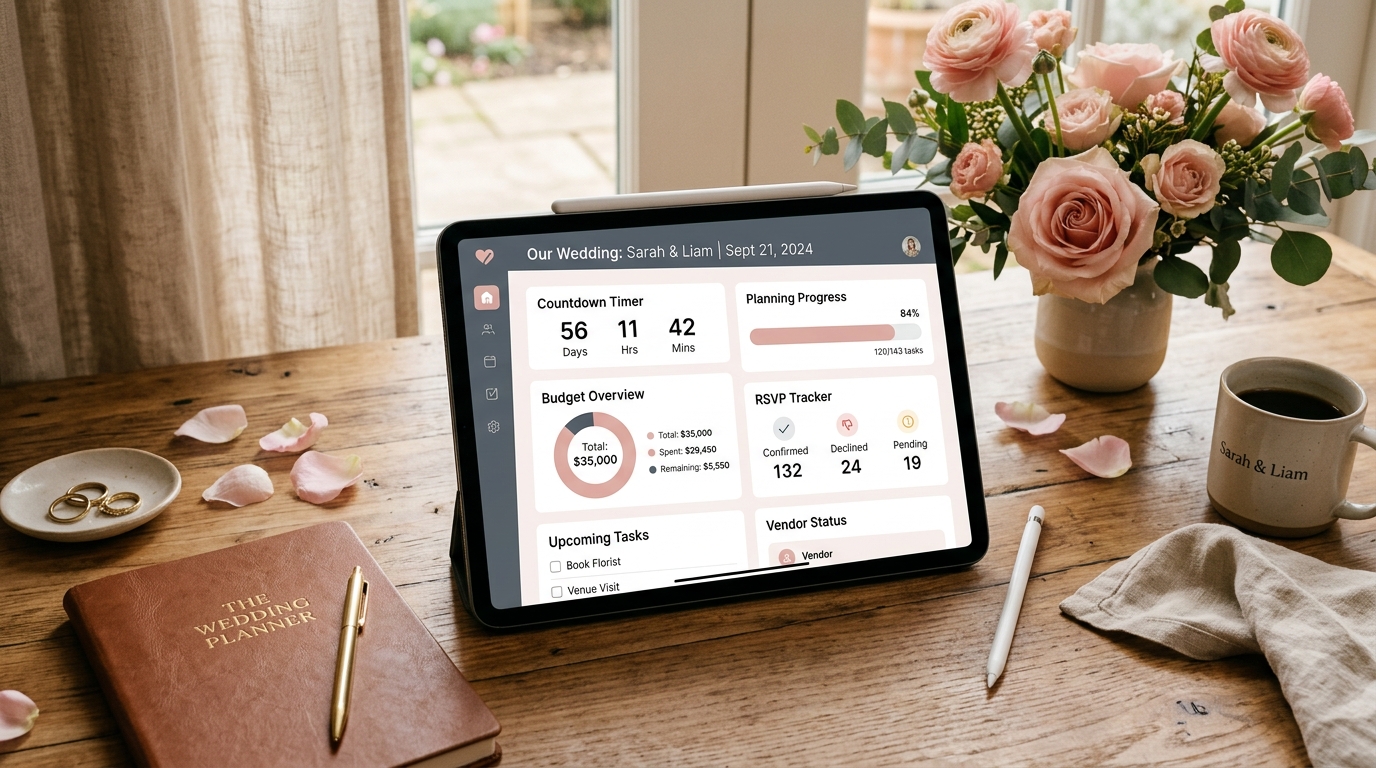
A central wedding planning dashboard tracking your countdown, budget, RSVPs, and key milestones in one unified view.
What Is a Wedding Planning Dashboard?
A wedding planning dashboard is a central screen that shows the current state of your whole wedding at a glance: days remaining, tasks finished, deadlines coming up, guest replies received, and milestones reached. It's the view from above, not another list to maintain. Some couples call it a wedding planning tracker or a wedding planning organizer, and the idea is the same.
The important word is summary. A checklist tells you what to do, and a budget tool tells you what you've spent. A wedding planning dashboard sits over both and answers a simpler question: are we on track?
The dashboard on this site works that way. It's a central hub with at-a-glance stats, a countdown, a milestone tracker, a progress breakdown, and quick links into the other interactive wedding planning tools. Think of it as the front door to the rest of the suite.
Why Use a Wedding Planning Dashboard Instead of Spreadsheets and Notes?
Because planning information scatters, and scattered information causes missed deadlines. A wedding planning dashboard keeps the overall picture in one place, so you can spot a problem while it's still small.
That doesn't make spreadsheets or notes bad. Each one has a job, and the table below shows where each shines and where it tends to struggle.
| Method | Works well for | Where it breaks down |
|---|---|---|
| Paper binder | Contracts, fabric swatches, printed checklists | One copy, easy to lose, can't tell you what's overdue |
| Spreadsheet | Detailed budgets and guest data | You build it yourself, formulas break, nothing flags a missed deadline |
| Notes app | Quick ideas and vendor questions | Ideas pile up unsorted and progress is invisible |
| Wedding planning dashboard | Overall status: countdown, tasks, RSVPs, milestones | Summarizes rather than replaces detailed records like signed contracts |
Three practical benefits show up once you start using one.
Fewer "where did I put that?" moments
When the countdown, tasks, and RSVPs share a screen, you stop opening four apps to answer one question.
Shared status without a meeting
You and your partner can look at the same numbers and agree on what's next, instead of relaying updates by text.
Early warnings
An overdue task or a slow RSVP count is easy to ignore inside a long list. On a dashboard, it stares back at you.
What Should a Wedding Planning Dashboard Track?
A good wedding planning dashboard tracks six things: your countdown, tasks and deadlines, budget, guest RSVPs, vendors, and milestones. Each answers a different question, and leaving one out creates a blind spot.
⏱ Countdown to Your Wedding Date
Everything else hangs off your date. Seeing the days and weeks left turns "we have plenty of time" into an actual number. The tools on this site sync with your wedding date, and the standalone wedding countdown adds a live ticking timer if you like the visual.
📋 Tasks and Deadlines
Separate what's due soon from what's merely someday. A dashboard that shows only the next few deadlines feels manageable, while a 200-item list feels like a verdict. Build the full list with the Wedding Checklist Generator, which sequences tasks backward from your date, then let the dashboard show your progress.
💰 Budget
Track three numbers: your total budget, what's already committed, and what's left. Category detail belongs in a dedicated tool such as the wedding budget calculator, while the dashboard keeps the headline figures in view. A cushion of 5 to 10 percent for surprises is a sensible habit.
👥 Guest RSVPs
Headcount drives catering, seating, and venue capacity, so it deserves a permanent spot. Watch how many people are invited, how many have replied, and how many said yes, no, or maybe. The Guest List Manager holds the detail, including meal preferences and plus-ones.
🤝 Vendors and Deposits
For each vendor, note whether they're booked, what you've paid, and when the balance is due. Final payments are easy to miss because they land months after the contract was signed. The vendor booking order and contract checklist shows which vendors to lock in first.
🎯 Milestones and Overall Progress
Milestones are the big decisions everything else depends on: venue signed, photographer booked, attire ordered, invitations sent. A percentage-complete figure is motivating, but the milestone list is more honest. The Wedding Milestone Tracker follows those key decisions as you complete them.
Dashboard vs. Checklist vs. Timeline: What's the Difference?
They overlap, but they aren't interchangeable. A checklist answers what needs doing, a timeline answers when, and a wedding planning dashboard answers whether you're on track. Here's how the pieces fit together.
| Tool | The question it answers | Where to find it |
|---|---|---|
| Checklist | What still needs doing? | 12-Month Wedding Planning Checklist |
| Timeline | When should each task happen? | Wedding Planning Timeline |
| Calendar | Which appointments are coming up? | Wedding Planning Calendar |
| Budget calculator | What can we spend, and where? | Budget Calculator |
| Wedding planning dashboard | Are we on track overall? | Wedding Planning Dashboard |
If you're starting from zero, work in roughly that order: date, checklist, timeline, budget, guest list. The dashboard gets more useful with every piece you add, which is why it works best as your home base rather than your first stop. For the full planning sequence, read our ultimate wedding planning checklists guide.
How to Set Up Your Wedding Planning Dashboard in 30 Minutes
Setting up a wedding planning dashboard takes six steps: fix your date, generate your tasks, set your budget, load your guests, mark your milestones, and book a weekly review. Expect roughly half an hour if you already know your date and a ballpark budget.
Fix your wedding date
A tentative date is fine, and you can change it later. Enter it first, because the site's tools sync with your wedding date.
Generate your task list
Run the Wedding Checklist Generator for a personalized list, or pick a timeline that matches your countdown, such as the 12-month checklist above.
Set your budget ceiling
Enter your total in the calculator to get category-level targets before you fall in love with a venue you can't afford.
Load your guest list
A rough list beats no list. Add names now and refine them as RSVPs arrive.
Mark your milestones
Pick the five decisions that matter most this quarter, usually venue, photographer, caterer, attire, and invitations.
Schedule a weekly review
Put 15 minutes on both calendars, then open your wedding planning dashboard for the first check-in. The habit matters more than the setup.
How Often Should You Check Your Dashboard?
Once a week is enough for most of the engagement, then every few days during the last two months. A short, regular check beats a long, occasional one.
Here's a 15-minute weekly routine that keeps things honest:
- ✓Glance at the countdown and note how many weeks remain.
- ✓Clear or reschedule anything overdue.
- ✓Update RSVPs and vendor replies.
- ✓Pick the next three tasks and put dates on them.
- ✓Compare remaining budget with what you've committed.
What to Focus On at Each Planning Stage
Your dashboard should look different at month twelve than at week three. This table shows where to point your attention.
| Time to wedding | Dashboard focus | Helpful next step |
|---|---|---|
| 12+ months | Date, budget, venue, rough guest count | How to choose a wedding venue |
| 6 to 11 months | Core vendors, attire, save-the-dates | Vendor booking checklist |
| 3 to 5 months | Invitations, RSVPs, menu, fittings | Guest List & RSVP Master Checklist |
| Final month | Final headcount, vendor payments, day-of plan | Day-of Timeline Generator |
Short on time? The 3-month express checklist trims the task list, and the dashboard keeps that smaller list visible.
Using a Wedding Planning Dashboard for Pakistani, Indian, and Multi-Day Weddings
Multi-day weddings need one adjustment: a single countdown isn't enough. A Pakistani wedding may include a Dholki, Mayun, Mehndi, Baraat, Nikkah, and Walima, while an Indian wedding may include a Haldi, Mehendi, Sangeet, Mandap ceremony, and reception. Each event has its own guest count, venue, outfits, and vendors.
So build your wedding planning dashboard around events instead of one big day. In whatever task list you use, start each task with the function, like "Mehndi: confirm decorator" or "Walima: final headcount," so you can see at a glance which event is falling behind. Track guest numbers per function too, since they rarely match.
The Pakistani & Muslim multi-day wedding checklist and the Indian wedding master checklist list tasks by function. Outfit fittings and hair trials for every event also deserve a place on your milestone list, and our guides to Pakistani wedding outfits and Pakistani wedding hairstyles will help you plan them.
Sharing Your Dashboard With a Partner, Family, or Planner
One practical detail: the tools on this site save your progress in your browser. That keeps things simple and private, but it also means your data lives on the device and browser you used.
If two of you are planning, pick one keeper of the dashboard and share a quick summary after each weekly review. A screenshot works fine. As with any browser-based tool, clearing your browser data can remove saved progress, so keep a printed or screenshot copy of the figures that matter most, such as your total budget and confirmed headcount.
Professionals searching for a wedding planner dashboard can use the same approach for one couple at a time. If you juggle several weddings at once, a browser-saved tool is probably better as a personal working view than as a client portfolio system.
Common Dashboard Mistakes to Avoid
If every idea becomes a task, the dashboard stops showing what's urgent. Keep inspiration in a wedding moodboard instead.
Without a wedding date, countdowns and task sequencing can't work.
Six headline numbers beat sixty.
A dashboard only helps if you open it on a schedule.
Signed contracts and receipts still need their own folder.
A headcount that's three weeks old is really a guess.
Frequently Asked Questions
Start Your Wedding Planning Dashboard Today
A wedding planning dashboard won't plan the wedding for you. What it does is give you one honest view of where things stand, so decisions get made on time and nothing important slips through.
Start small. Enter your date, generate your checklist, and open the free Wedding Planning Dashboard for your first weekly review. When you want the full picture of every stage, read our full wedding planning checklists guide, then come back and watch the progress add up.