

What Is a Wedding Moodboard?
A wedding moodboard is a single page of images, color swatches, textures, and a few words that shows how your wedding should look and feel. Think of it as a visual brief. Instead of telling your florist you want “romantic but not fussy,” you show them.
You’ll also hear it called a wedding mood board, an inspiration board, or a vision board. The name doesn’t matter. The job is the same: turn a loose idea in your head into something other people can read in about ten seconds.
A good board usually carries five things:
- Three style words that set the direction
- A color palette of five shades or fewer
- Flowers, greenery, and tablescape images
- Fabric, linen, and material textures
- Outfit, hair, and lighting references
Once you know what belongs on the board, how to create a wedding moodboard becomes a matter of collecting, sorting, and editing. The steps below show exactly how.
Why a Wedding Moodboard Matters Before You Book Vendors
Most couples start collecting ideas long before they commit to anything. Without a board, those ideas pile up in screenshots and saved posts that quietly contradict each other. A sage-green tablescape here, a deep burgundy bouquet there, a gold-heavy stage somewhere else.
A moodboard forces you to choose. That has three practical payoffs.
Your vendors work from the same picture. The florist, decorator, stylist, and photographer each read your taste differently. One shared board closes that gap.
You say no faster. When a venue tour or a vendor pitch drifts from your board, you notice immediately.
You protect your budget. Impulse décor purchases usually come from not knowing what you actually want. A finished board makes it easier to plan spending with the wedding budget calculator instead of reacting to every pretty thing you see.
How to Create a Wedding Moodboard in 8 Steps
Here is how to create a wedding moodboard from a blank page to a finished PDF, in order. Set aside two or three evenings. It doesn’t need to happen in one sitting, and it shouldn’t.
Step 1: Pick Three Style Words
Write down the first words that come to mind when you picture the day. Modern, romantic, minimalist. Or rustic, warm, lively. Or regal, jeweled, traditional.
Narrow the list to three. Every image you add later has to fit at least two of them. If it doesn’t, it stays out. This one rule does most of the editing for you.
Step 2: Do a Quick Image Sweep
Spend 30 minutes saving anything that catches your eye. Use Pinterest, Instagram, magazines, or your own photos. Don’t judge yet. Pinterest lets you split one board into sections, so you can sort saves into flowers, tables, attire, and lighting as you go.
Ask your partner to run their own sweep. Comparing two sets of saves is the fastest way to find what you both actually like.
Step 3: Spot the Patterns
Scroll through everything you saved and look for repeats. Maybe 14 of your images feature white ranunculus. Maybe nearly every table has candlelight and no overhead glare. Those repeats are your real taste. Write them down.
Step 4: Build Your Color Palette
Pull colors from your strongest images rather than picking them from a paint chart. A simple structure keeps the palette usable:
- 1 base color (the shade you’ll see most, such as ivory or blush)
- 2 supporting colors (such as sage and dusty rose)
- 2 accent colors (often metals like gold or brass, or one bold pop)
Five is a ceiling, not a target. Many beautiful weddings use three. Test the palette in daylight and in candlelight, because some colors shift a lot under warm bulbs.
Step 5: Choose Your Layout and Format
Decide whether your board will live on a screen or on paper. Digital boards are easier to edit and share. Physical boards, on foam core or a corkboard, are nice to carry to a florist meeting. Many couples build one of each. The layout section below shows how to arrange the pieces.
Step 6: Assemble the Board
Start with your three style words and color swatches. Then add your strongest hero image, usually a tablescape or ceremony scene. Fill in with flowers, textures, attire, and stationery. Keep 8 to 15 images in total. Past that, a board turns into a scrapbook and stops being a brief.
Step 7: Edit Hard
Step back for a day, then look again. Remove anything that doesn’t match two style words. Remove near-duplicates. Check that your colors still read as one family. Then ask a friend what the board says about the wedding. If their answer matches your three words, you’re done.
Step 8: Share It With Your Team
Export the final board as a PDF or image and send it to the people who need it. We cover exactly how in the vendor section below.
The Wedding Moodboard Layout That Works
A layout is simply where each piece goes. A predictable layout helps vendors find what they need quickly. The grid below works for most weddings.
| Board Section | What Goes There | Suggested Size |
|---|---|---|
| Title strip | Couple names or event name, plus your three style words | Top band |
| Hero image | The single image that captures the whole mood | Largest tile (about one third of the board) |
| Color palette | 5 swatches or fewer, labeled base, supporting, accent | Row of small squares |
| Florals and greenery | 2 to 3 images of bouquets, centerpieces, and ceremony flowers | Medium tiles |
| Tablescape and décor | Table settings, linens, candles, signage, lighting | Medium tiles |
| Textures and materials | Fabric swatches, wood, stone, paper, metal finishes | Small tiles |
| Attire and beauty | Outfit and hair references | Medium tiles |
| Typography | One or two font styles for stationery and signage | Small strip |
Two layout tips help more than anything else. First, make the hero image noticeably larger than the rest so the eye has an anchor. Second, leave a little white space between tiles. Crowded boards look confusing even when the images are lovely.
Wedding Mood Board Template Options (Free and Paid)
You don’t need design skills. A template does the arranging, and you swap in your own images. Here are the common routes and what each is best for.
| Tool | Cost | Best For | Export |
|---|---|---|---|
| Canva | Free plan available, with some paid elements | Fast, polished boards from a template | PDF, PNG, JPG |
| PowerPoint or Google Slides | Free with Google; PowerPoint depends on your plan | Full control and easy edits | PDF, PPT, images |
| Free | Collecting and sorting ideas before you design | Shareable board link | |
| Printed collage | Cost of prints and a foam board | Carrying to in-person meetings | Photo of the board |
Pricing and plan limits change, so check the tool before you commit.
A Free Wedding Mood Board Template in Canva
Canva has a large library of mood board layouts you can search under “wedding mood board.” Pick one, then replace the placeholder photos with your own. Use the Uploads tab for your saved images, and use the color tool to match your swatches to the exact shades in your photos. If you want a clean grid with no template at all, a blank page plus a few resized frames gives you the same result.
A Wedding Mood Board Template in PowerPoint or Google Slides
Slides is easier to control than most people expect. Set a blank slide to widescreen, draw rectangles for your tiles, then drag your images in and crop each to fit. Because every tile is a separate object, you can move things around without rebuilding. It’s also the best route if you want a wedding mood board template PPT that your planner can edit later.
How to Create a Wedding Moodboard PDF
A PDF is the safest format to send vendors because it looks identical on every device. In Canva, use Share, then Download, then choose PDF. In PowerPoint, use Save As and pick PDF. In Google Slides, use File, then Download, then PDF Document. Name the file clearly, for example “Last-Name-Wedding-Moodboard.pdf,” so it doesn’t get lost in an inbox.
Wedding Mood Board Examples by Style
Looking at finished directions can help you find your own. These six are starting points. Mix and adapt them.
| Style | Style Words | Palette Idea | Textures and Details |
|---|---|---|---|
| Soft garden romance | Romantic, airy, natural | Ivory base, blush and sage, soft gold accent | Loose florals, linen, taper candles |
| Modern minimalist | Clean, quiet, architectural | White base, stone gray and charcoal, brass accent | Glass, matte ceramics, single-stem arrangements |
| Warm boho | Earthy, relaxed, layered | Cream base, terracotta and olive, copper accent | Pampas grass, rattan, woven textiles |
| Classic ivory and gold | Timeless, formal, elegant | Ivory base, champagne and deep green, gold accent | Silk, crystal, tall candelabras |
| Rich jewel tones | Regal, bold, festive | Deep burgundy base, emerald and gold, ivory accent | Velvet, brocade, heavy embroidery |
| Rustic outdoor | Cozy, warm, casual | Cream base, forest green and wood brown, black accent | Timber tables, wildflowers, lanterns |
None of these is “correct.” The best board is the one that sounds like you two, so treat each row as a shortcut for your first draft.
Moodboards for Multi-Day and South Asian Weddings
If you’re planning a Mehndi, Baraat, Walima, or a Nikkah plus reception, one board rarely covers everything. Each function usually has its own color story, attire, and décor. A haldi or mehndi day leans bright and playful. A Baraat or wedding-day look is often richer and more formal. A walima may drift softer.
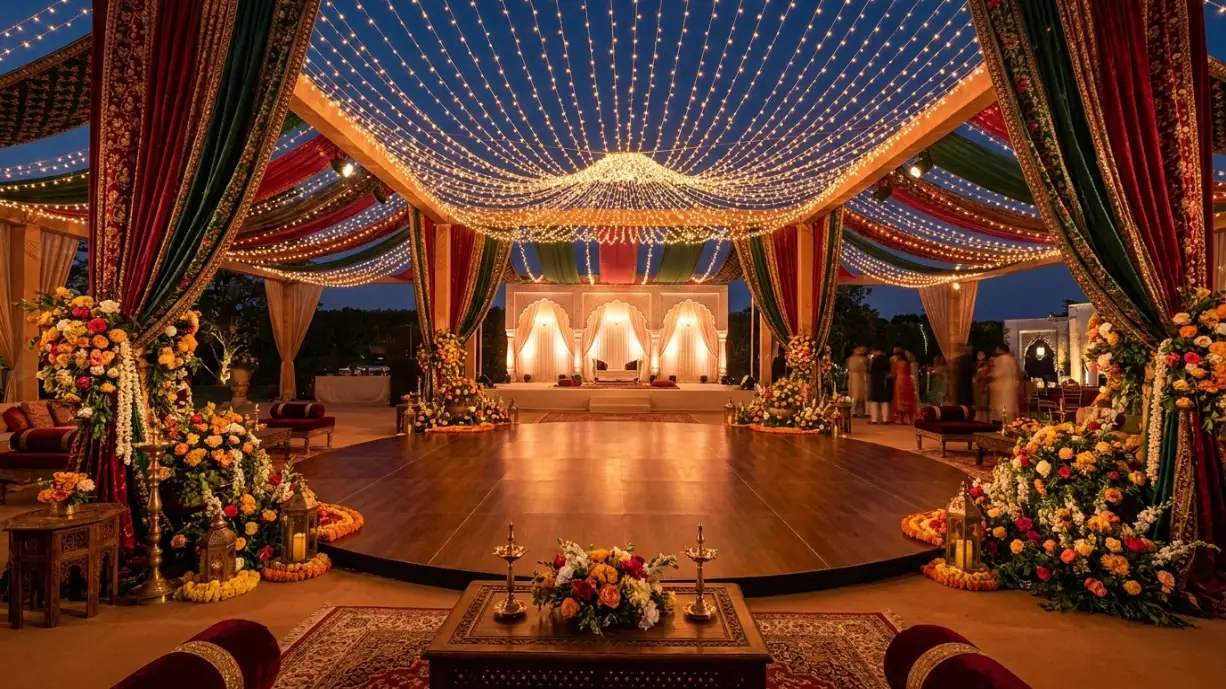
How to create a wedding moodboard for several events follows the same eight steps, repeated once per function. A practical way to handle it is a master board plus one mini-board per event. The master board holds the shared elements, like your base color and metal tone, so the days still feel connected. Each mini-board then carries its own palette, florals, and outfits. If you’re still working out outfits, our guides to Pakistani wedding outfits for brides and wedding outfits are good places to pull references. For hair, the Pakistani wedding hairstyles guide covers looks by function, and our bridal hairstyles for weddings guide is broader. The full planning list for these events lives in the Pakistani and Muslim multi-day wedding checklist.
Add Photo and Portrait References
Your board can also guide your photographer. Add one or two portrait references that match your mood: soft natural light for a garden board, high-contrast flash for a modern one. If you’re camera-shy, pair your board with our guide to wedding photography poses for beginners so your portraits feel as planned as your décor.
How to Share Your Wedding Moodboard With Vendors
A board only helps if the right people see it. Send it when you start conversations, not after the contract is signed.
- Florist: Send the full PDF and point to the florals tiles. Mention the colors you want to avoid.
- Decorator or stylist: Highlight the hero image, tablescape tiles, and lighting.
- Photographer or videographer: Highlight lighting, portrait references, and the overall palette.
- Stationer: Highlight typography and paper textures.
- Hair and makeup artist: Share attire and beauty tiles.
- Venue coordinator: Share the hero image and palette, so they can flag anything the space can’t support.
Add two sentences of context with every board. Say what you love most and what’s flexible. Then use our wedding vendor booking checklist to keep the booking order straight, and the decor and floral checklist to confirm every item on your board is covered.
When to Make Your Wedding Moodboard
Make your first draft early, ideally just after you set your budget and before you tour venues in earnest. Your board helps you judge whether a space suits your style. Our guide to choosing the perfect wedding venue explains what to look for once you have a direction.
If you follow a longer schedule, the 14-month wedding planning timeline places style decisions early, so your vendors have the board well before final details are due. Short on time? A board can come together in a weekend. Open the Wedding Countdown tool, see how many weeks you have left, and set your board deadline accordingly. Then track the remaining tasks in the Wedding Planning Dashboard.
Common Wedding Moodboard Mistakes
Most problems with how to create a wedding moodboard come down to the same few habits. Watch for these before you share your board.
- Too many ideas. More than 15 images usually means the style isn’t decided yet.
- Too many colors. If you can’t name your palette in one breath, trim it.
- Pretty but impractical. A stunning image from a different season or climate may not work for your date. Check availability of flowers and whether your venue allows candles.
- Ignoring the budget. A board full of luxury florals sets expectations your budget may not meet. Compare it against your numbers early.
- Never sharing it. A board that stays on your phone can’t do its job.
- Copying a single wedding. Borrow ideas from many sources so the result feels personal.
You can also use your colour and fabric references when choosing nail colours from your moodboard for a coordinated bridal look.